
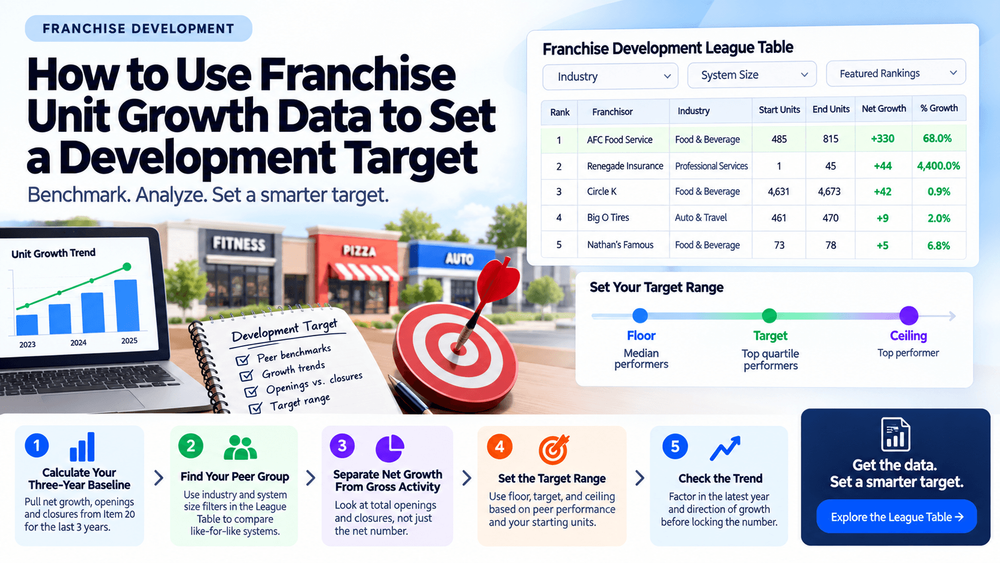
Franchise development targets are often set from the top down. A brand decides it wants 50 new units next year because leadership said so, because a competitor crossed a milestone, or because the number feels achievable. The FDD data behind that target is rarely part of the conversation.
Item 20 of every franchisor's FDD discloses three years of outlet activity: how many units opened, how many closed, and the net result. That data exists across hundreds of systems. It makes it possible to set a development target from what peer systems of similar size and industry actually did, not from an internal goal that has no external reference point.
Why Most Development Targets Are Set Without Peer Data
A development team building next year's plan typically works from three inputs: last year's results, the budget approved by leadership, and a rough sense of what the market can absorb.
What is usually missing is a structured comparison of what systems in the same industry and size band actually produced. Without that reference, a target of 40 net new units could be aggressive, conservative, or completely disconnected from what is realistic for a system at that stage.
Franchimp's Franchise Development League Table ranks 678 systems by net unit growth from FDD data. That is a peer dataset. It turns a number set internally into one that can be tested against external performance.
Step 1: Calculate Your Own Three-Year Baseline
Before benchmarking against peers, establish your own system's trajectory from Item 20.
Pull net unit growth for each of the last three fiscal years separately, not as a combined total. Use this as your template, filled in from your own Item 20 figures:
| Year | Start Units | End Units | Net Growth | Percent Growth |
|---|---|---|---|---|
| Year 1 | Your figure | Your figure | Your figure | Your figure |
| Year 2 | Your figure | Your figure | Your figure | Your figure |
| Year 3 | Your figure | Your figure | Your figure | Your figure |
Track openings and closures as separate figures inside each year. A net gain of +10 could mean 15 openings and 5 closures, or 30 openings and 20 closures. The gross activity behind the net number tells you whether your pipeline is healthy or whether you are running to stay in place.
Once you have three years of data, check the direction. Consistent growth, flat performance, or a peak followed by contraction each point to a different planning assumption for the year ahead.
Step 2: Find Your Peer Group in the League Table
A peer group for development benchmarking has two filters: industry and system size.
Industry matters because growth norms vary significantly across categories. A 10% growth rate in one sector sits in the top quartile. In another, it is median performance. Comparing across industries produces a benchmark that reflects the category average, not your competitive reality.
System size matters because percent growth gets harder as a system scales. Using data from Franchimp's fitness franchise analysis, Planet Fitness added 405 net units over three years at 19.8% cumulative growth. Snap Fitness lost 119 units at -18.9%. Both are large systems by boutique standards. StretchLab grew 227.7% across the same window, but started from a base of 148 units. Comparing StretchLab's percentage to Planet Fitness's percentage is not a useful benchmark for either brand.
The League Table's Featured Rankings give you pre-configured peer views based on specific development questions. Instead of starting from the full 678-system list, these filters narrow to the comparison that matches your situation:
| Featured Ranking | What It Shows | Best For |
|---|---|---|
| Small Giants | Net unit growth, systems under 100 units | Early-stage systems benchmarking against similar-size peers |
| Heavy Hitters | Net unit growth, systems with 500+ units | Large systems benchmarking against other large systems |
| Momentum Kings | Total new units opened, all franchises | Measuring gross sales activity, not just net growth |
| Attrition Avengers | Franchisee attrition rate, lowest to highest | Identifying which systems retain franchisees most effectively |
| Retention Rate Champions | Franchisee retention rate, highest to lowest | Benchmarking retention as a development health indicator |
| Franchisor-Driven Growth | Company-owned net unit growth | Understanding how much of a system's growth is franchisor-led vs. franchisee-led |
| QSR Power Players | Net unit growth, fast food, pizza & coffee | QSR-specific peer comparison |
| Home Services Heroes | Net unit growth, home services sector | Home services peer comparison |
| Hot Resale Market | Intra-franchisee transfer rate | Tracking how actively existing franchisees are selling units |
Source: Franchimp Franchise Development League Table Featured Rankings, 2026.
A meaningful peer comparison picks the Featured Ranking that matches your system's size and industry, then checks where your own net growth figure lands within that group.
Step 3: Separate Net Growth From Gross Activity
Net growth is the output. Gross activity — total openings and total closures separately — is the input that produced it.
Two systems can show identical net growth of +20 units. One opened 22 and closed 2. The other opened 60 and closed 40. The first system has a stable base and moderate sales activity. The second has high sales volume with a significant retention problem. A development target built only on net units misses that distinction entirely.
Coverall's 2026 FDD illustrates this clearly. The system sold 329 new franchises in fiscal 2025 and produced a net unit gain of only 81 locations. Closures offset new openings at a rate that absorbed most of the sales volume. A development target set from gross sales alone would have looked like strong performance. The net figure tells a different story.
When setting a development target, set two numbers: gross openings required and the closure rate you are planning against. Net growth is what remains after both.
Step 4: Set the Target Range, Not a Single Number
A single development target creates one outcome: hit or miss. A target range built from peer data gives you three reference points.
Floor: the net growth rate of median performers in your peer group, applied to your starting unit count. This is the minimum that keeps you competitive within the category.
Target: the net growth rate of top-quartile performers in your peer group. Achievable for a system with a functioning pipeline and adequate franchisee support capacity.
Ceiling: the top performer in your peer group by percent growth, applied to your starting unit count. Useful for stress-testing the pipeline, not for committing to publicly.
If your three-year baseline sits below the floor for your peer group, the target is less useful than understanding why the gap exists before setting a number for next year.
Step 5: Check the Trend Before You Lock the Number
A target for next year should account for the direction your system is moving, not just where it has been.
Orangetheory Fitness produced a three-year net gain of +36 units, but peaked at 1,311 locations and has since pulled back to 1,283. A development team at Orangetheory setting a target from the three-year cumulative figure would be planning against a growth trend that has already reversed. The full fitness franchise breakdown covers how that trajectory compares across the boutique segment.
The most recent year's net growth is the leading indicator. If it is lower than the prior year, the target needs to account for the slowdown, not assume a return to prior performance without a specific plan to produce it.
Using the League Table for Ongoing Benchmarking
A development target is a starting point, not a fixed commitment. System performance changes, market conditions shift, and competitor trajectories evolve.
Franchimp's Franchise Development League Table covers 678 franchise systems ranked by net unit growth from FDD data. Premium filters let you narrow by industry, system size, geographic footprint, and Item 19 disclosure status, so peer comparisons update as new FDD filings come in rather than relying on a static snapshot.